Roles and permissions
Reference for the organization and workspace roles and what each one can do.
Mercel uses a fixed set of roles at two levels: the organization and the individual workspace. Organization → Members → Roles shows the full permission grid for both.
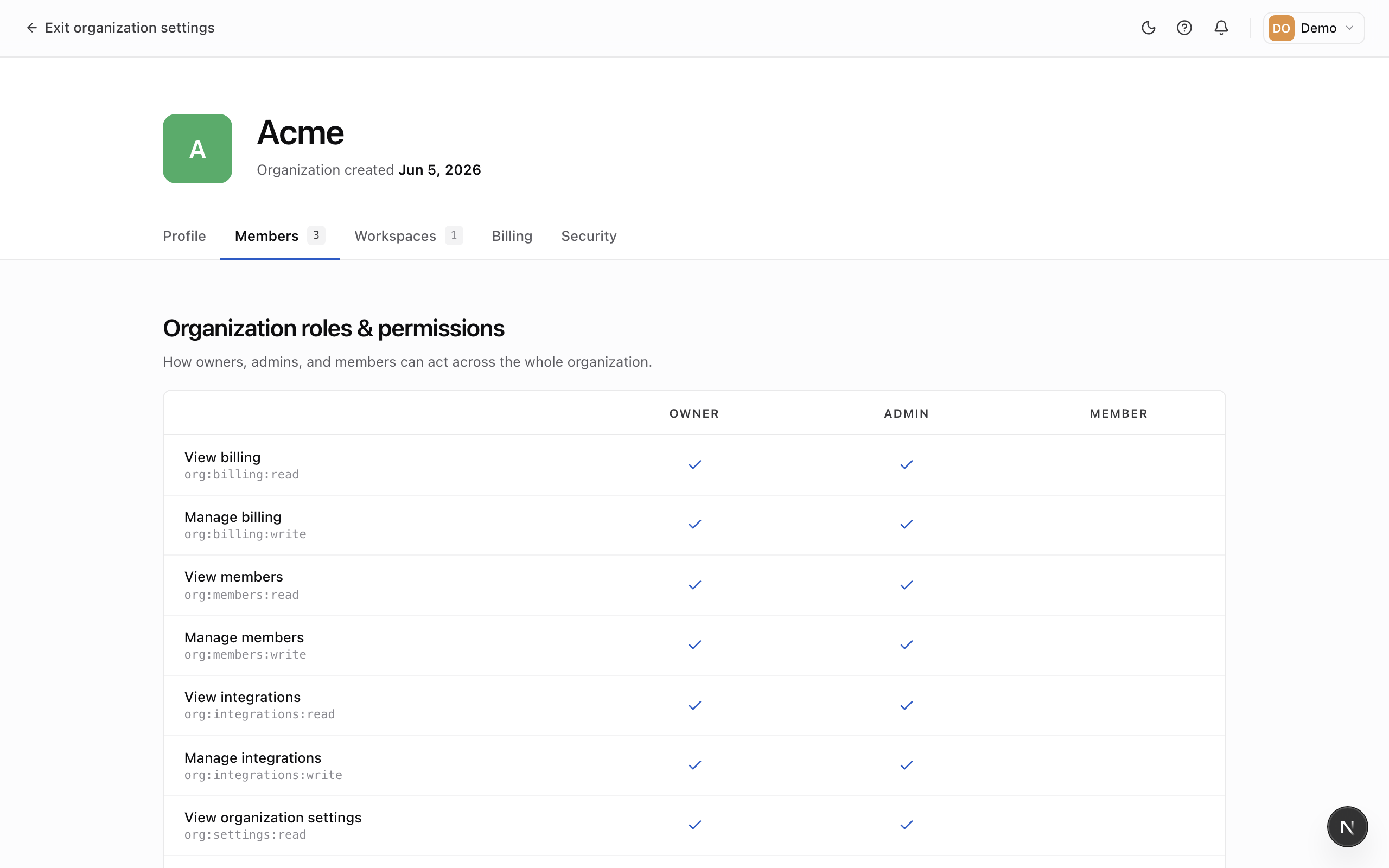
Organization roles
- Owner — full control of the organization, including security policy and transferring ownership. Each organization has exactly one owner.
- Admin — manages members, workspaces, and settings, but can't transfer the organization.
- Member — belongs to the organization and works in the workspaces they're added to, without organization-wide administration.
Workspace roles
Membership in a workspace is separate from the organization role, so you can give someone broad organization access but a narrow role in a particular workspace (or vice versa).
- Admin — manages the workspace's settings, team, and developer access.
- Member — works day-to-day in the workspace without managing its settings or team.
Reading the grid
The Roles page is a read-only reference — you don't edit permissions here. Each column is a role and each row is a single permission; a checkmark means that role is granted it. Use it to decide which role to give someone when you invite them.